The Technology Behind Modern Data Centers
The cloud may feel invisible to users, but it depends on buildings filled with computing, storage, networking, power, cooling, and carefully managed infrastructure.
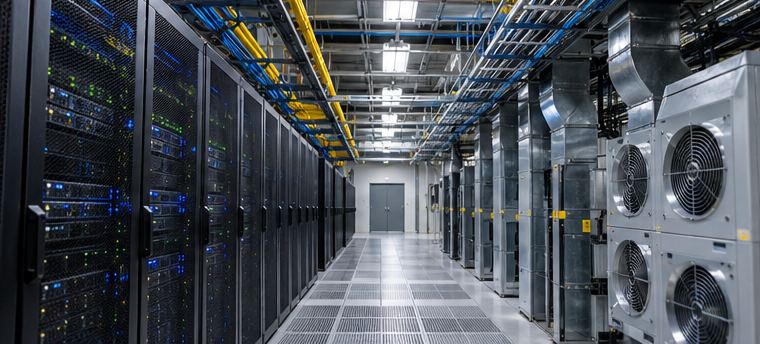
From Computer Rooms to Purpose-Built Data Centers
Early organizations often operated computers in dedicated rooms with raised floors, controlled access, and specialized cooling. As systems grew, the computer room evolved into a purpose-built data center designed to support large numbers of servers and network devices. These facilities must operate continuously and protect equipment from environmental, electrical, and physical risks.
A modern data center is more than a room full of computers. It is a coordinated facility with power distribution, backup generation, cooling, fire detection, physical security, connectivity, monitoring, and operational procedures. The building and its supporting systems are as important to availability as the servers themselves.
Data centers vary enormously. A small enterprise facility may support one organization, while hyperscale campuses operated by major cloud providers can contain enormous amounts of computing and storage capacity. Their designs reflect different requirements for scale, redundancy, cost, and geographic distribution.
Servers, Racks, and Hardware
Servers are computers designed to provide services to other systems. They may run web applications, databases, authentication, file storage, virtualization, analytics, and many other workloads. Unlike a typical desktop PC, a server is often built for remote management, sustained operation, redundant components, and installation in a rack.
Racks organize servers, switches, storage systems, and power equipment into standardized enclosures. This makes it easier to manage cabling, airflow, service access, and physical space. A data center may contain thousands of devices connected through carefully planned network and power layouts.
Hardware is selected to match the workload. Database servers may prioritize memory and storage performance; compute clusters may emphasize CPU or GPU resources; storage systems may focus on capacity and resilience. Modern facilities combine general-purpose servers with specialized accelerators and purpose-built appliances.
Networking: Connecting Everything
Data centers depend on high-capacity networks that connect servers to one another, to storage systems, to other facilities, and to the public internet. Network switches move traffic within a data center, while routers connect networks and direct traffic between locations. Fiber-optic links are widely used for high-speed connections over longer distances.
Network architecture affects both performance and reliability. Redundant paths can allow traffic to continue if a link or device fails. Segmentation can separate workloads and limit unnecessary communication. Load balancers distribute application requests across multiple servers, helping systems handle traffic and avoid depending on one machine.
Connectivity also extends beyond the building. Data centers connect to internet service providers, cloud networks, content delivery networks, private enterprise networks, and other facilities. Diverse fiber routes and multiple carriers can reduce the risk that one cable cut or provider outage will disconnect a site.
Power: Keeping Equipment Running
Servers and network equipment require stable electrical power. Data centers use utility feeds, transformers, switchgear, power distribution units, and monitoring systems to deliver electricity safely. Because even a brief interruption can disrupt services, facilities commonly use uninterruptible power supplies (UPS) to bridge short outages and provide time for backup generators to start.
Generators can supply power during longer utility interruptions, provided fuel and maintenance arrangements are in place. Redundant power paths and equipment can reduce the impact of component failure, but redundancy must be designed and tested. A second power supply connected to the same failed circuit does not provide meaningful independence.
Power efficiency is a major operating concern. Computing demand has grown, and high-density servers and accelerators can draw substantial power. Operators monitor energy use, plan electrical capacity, and consider how much of the facility’s energy supports IT equipment versus cooling and other building systems.
Cooling and Environmental Management
Processors, memory, storage, and power equipment generate heat. If temperatures rise beyond operating limits, hardware may throttle performance, shut down, or fail prematurely. Data centers use air conditioning, airflow management, containment, fans, heat exchangers, and other cooling methods to remove heat and maintain suitable conditions.
Hot-aisle and cold-aisle arrangements help direct airflow through racks. Blanking panels, cable management, and floor or overhead air distribution can reduce mixing between hot exhaust air and cool supply air. More recent high-density computing environments may use direct-to-chip liquid cooling or other liquid-based approaches.
Cooling design is closely tied to energy use, facility location, climate, water availability, and hardware density. Operators balance reliability, efficiency, environmental impact, and cost. There is no one cooling approach that fits every data center.
Physical Security and Continuous Monitoring
Data centers protect equipment and information through layered physical security. Measures may include perimeter controls, security staff, access badges, visitor procedures, cameras, locked cages, and logging of entry. The specific controls depend on the facility and the sensitivity of the workloads it hosts.
Monitoring systems track temperature, humidity, power, cooling, network performance, hardware health, and security events. Operations teams use alerts and procedures to respond to problems before they affect customers. Monitoring is only useful when alerts are meaningful and someone is responsible for investigating them.
Physical security complements cybersecurity. A well-protected building does not automatically make every hosted application secure. Access permissions, software updates, encryption, network configuration, backups, and application design remain important responsibilities.
Redundancy, Resilience, and Disaster Recovery
Redundancy means having additional components or paths available when something fails. Data centers may use redundant power supplies, network links, cooling equipment, storage controllers, and servers. Some services can automatically move workloads or traffic to healthy systems when a component becomes unavailable.
Redundancy inside one facility does not protect against every disaster. A fire, flood, regional power problem, major network outage, or other event can affect an entire site. Organizations with demanding availability requirements may replicate data and services across separate facilities or regions.
Disaster recovery is broader than having spare equipment. It includes documented recovery procedures, backup copies, tested restoration, defined recovery time objectives, and decisions about which services must return first. A plan that has never been tested may fail when it is needed most.
Data Centers and the Cloud
Cloud providers operate large fleets of data centers and expose computing resources through software services. Customers can create virtual machines, store files, deploy applications, and use managed services without operating the physical facility themselves. The provider manages much of the underlying infrastructure, while customers remain responsible for their own data, access controls, application configuration, and service design.
Cloud does not eliminate physical infrastructure; it changes how that infrastructure is pooled, automated, and delivered. A cloud application may use compute instances, object storage, databases, load balancers, content delivery, and monitoring services across multiple facilities. The architecture can be powerful, but it also requires attention to cost, security, resilience, and operational complexity.
Data centers will continue to evolve as demand grows for artificial intelligence, video, cloud applications, and connected devices. Power availability, cooling efficiency, network capacity, hardware specialization, and environmental impact will remain central design challenges. The digital services that appear effortless to users depend on this very physical infrastructure.
References and Further Reading
Putting technology to work for your business
Understanding the technology behind the systems we use helps businesses make better decisions about websites, hosting, data, and online operations. Dyeware provides website development and managed hosting services.