Graphics Processing Units (GPUs): From Video Games to Artificial Intelligence
How graphics processors evolved from displaying pixels to accelerating scientific computing, machine learning, and AI.
Understand GPUs, parallel processing, graphics pipelines, and the hardware powering modern AI. This guide follows the development of the technology, explains the ideas behind it, and considers the practical choices that shape how it is used today.
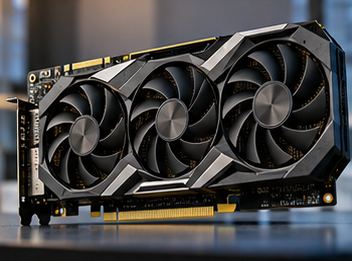
Why Computers Needed Graphics Hardware
Early personal computers generated displays using relatively simple hardware and software. The CPU handled much of the work required to draw text, shapes, and images. As graphical interfaces and video games became more demanding, this approach consumed an increasing share of processor time.
Dedicated graphics hardware evolved to accelerate operations such as drawing lines, filling polygons, moving pixels, and displaying images. Offloading this work allowed the CPU to focus on application logic while graphics hardware handled visual tasks more efficiently.
When evaluating this area, it helps to separate the underlying technology from the way a particular product implements it. Specifications, operating conditions, support policies, and the quality of the surrounding system all influence the result. A sound design starts with the actual requirement, then selects an approach that can be maintained and measured over time.
From 2D Acceleration to 3D Graphics
Early graphics accelerators improved 2D operations such as window movement, bit-block transfers, and screen drawing. The growth of 3D games created demand for hardware that could transform geometric objects, calculate lighting, map textures, and render scenes in real time.
A graphics pipeline processes geometry and pixels through multiple stages. Specialized hardware made it possible to render more complex scenes at higher frame rates. Over time, graphics processors became programmable, allowing developers to write shader programs that controlled parts of the rendering process.
When evaluating this area, it helps to separate the underlying technology from the way a particular product implements it. Specifications, operating conditions, support policies, and the quality of the surrounding system all influence the result. A sound design starts with the actual requirement, then selects an approach that can be maintained and measured over time.
What Makes a GPU Different from a CPU?
A CPU is designed for a wide range of tasks and often emphasizes low-latency execution, complex control flow, and a relatively small number of powerful cores. A GPU contains many processing units designed to execute large numbers of similar operations in parallel. This is particularly useful when the same mathematical operation must be applied to many data elements.
The distinction is not simply that a GPU is faster. CPUs are often better for sequential logic, operating-system work, and tasks with complex branching. GPUs excel at workloads with abundant parallelism, such as image processing, matrix operations, simulation, and certain scientific calculations. Modern systems use both processors together.
When evaluating this area, it helps to separate the underlying technology from the way a particular product implements it. Specifications, operating conditions, support policies, and the quality of the surrounding system all influence the result. A sound design starts with the actual requirement, then selects an approach that can be maintained and measured over time.
Programmable Shaders and General-Purpose GPU Computing
As GPUs became programmable, developers began using them for more than rendering. General-purpose GPU computing applies the GPU’s parallel execution model to tasks such as physics simulation, image analysis, financial modeling, and scientific research.
Programming frameworks and APIs provide ways to send data to the GPU, launch kernels, and retrieve results. Developers must consider memory transfers, data layout, synchronization, and the amount of parallel work available. A GPU can be powerful, but moving data to and from it may outweigh the benefit for small tasks.
When evaluating this area, it helps to separate the underlying technology from the way a particular product implements it. Specifications, operating conditions, support policies, and the quality of the surrounding system all influence the result. A sound design starts with the actual requirement, then selects an approach that can be maintained and measured over time.
GPUs and Artificial Intelligence
Many machine-learning workloads rely on matrix multiplication and other operations that can be parallelized. GPUs became important for training deep neural networks because they can perform large numbers of arithmetic operations concurrently. Specialized accelerators have also emerged to improve performance and energy efficiency for AI workloads.
Training and inference have different resource patterns. Training adjusts model parameters using large datasets and can require substantial compute. Inference runs a trained model to produce an output and may need to prioritize low latency, throughput, or cost. Both can use GPUs, but the most appropriate hardware depends on model size and deployment needs.
When evaluating this area, it helps to separate the underlying technology from the way a particular product implements it. Specifications, operating conditions, support policies, and the quality of the surrounding system all influence the result. A sound design starts with the actual requirement, then selects an approach that can be maintained and measured over time.
GPU Memory, Bandwidth, and Performance
GPU performance depends on more than the number of processing cores. Memory capacity, memory bandwidth, cache design, power limits, cooling, and software support all matter. Large AI models may be constrained by memory capacity even when a GPU has substantial arithmetic capability.
Data must move efficiently between system memory and GPU memory. High-bandwidth memory and fast interconnects can improve workloads that move large tensors or distribute work across multiple GPUs. Performance comparisons should use real application benchmarks rather than relying only on theoretical peak calculations.
When evaluating this area, it helps to separate the underlying technology from the way a particular product implements it. Specifications, operating conditions, support policies, and the quality of the surrounding system all influence the result. A sound design starts with the actual requirement, then selects an approach that can be maintained and measured over time.
The GPU Ecosystem
GPU vendors provide hardware, drivers, programming tools, libraries, and developer ecosystems. Graphics APIs support rendering, while compute frameworks and libraries support scientific and AI workloads. Software compatibility can influence hardware choices as much as raw specifications.
Cloud providers offer GPU instances for workloads that need temporary access to accelerators. Organizations must consider utilization and cost: an expensive GPU that sits idle may be less effective than a smaller system used efficiently. Scheduling, batching, quantization, and model selection can reduce infrastructure requirements.
When evaluating this area, it helps to separate the underlying technology from the way a particular product implements it. Specifications, operating conditions, support policies, and the quality of the surrounding system all influence the result. A sound design starts with the actual requirement, then selects an approach that can be maintained and measured over time.
Where GPUs Are Heading
GPUs continue to evolve for gaming, visualization, engineering, data science, and AI. Hardware ray tracing, neural rendering, video encoding, and specialized matrix operations are examples of capabilities that extend beyond traditional pixel drawing.
The broader lesson is that specialized processors emerge when a workload becomes important enough to justify dedicated hardware. CPUs, GPUs, AI accelerators, and other processors will coexist. The best system matches the architecture to the work rather than assuming one processor type should handle everything.
When evaluating this area, it helps to separate the underlying technology from the way a particular product implements it. Specifications, operating conditions, support policies, and the quality of the surrounding system all influence the result. A sound design starts with the actual requirement, then selects an approach that can be maintained and measured over time.
What to Remember
The history of graphics processing units (gpus): from video games to artificial intelligence shows that technology advances through a combination of engineering, standards, practical needs, and changes in cost. New capabilities rarely replace everything that came before. Older approaches often remain useful where they fit the workload, while newer ones create additional choices.
For businesses and technology users, the important questions are how a solution performs in its intended environment, how it is secured, how it can recover from failure, and whether it can evolve as requirements change. Understanding the fundamentals makes it easier to evaluate products and avoid decisions based only on marketing claims.