The Evolution of Computer Displays: From CRT Monitors to High-Resolution Screens
How computer displays evolved through CRT, LCD, LED backlighting, OLED, high refresh rates, and touch technology.
Explore the technologies behind the screens used with computers, phones, and modern devices. This guide follows the development of the technology, explains the ideas behind it, and considers the practical choices that shape how it is used today.
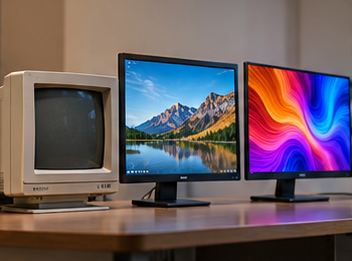
The CRT Era
Cathode-ray tube monitors dominated personal computing for decades. An electron beam scanned across a phosphor-coated screen, causing pixels or groups of phosphors to glow. CRTs were bulky and heavy, but they could provide good motion handling and a range of resolutions for their time.
Early computer displays were often monochrome or limited to a small number of colors. As graphics capabilities improved, monitors supported higher resolutions and richer color. The display and graphics adapter had to work together, and users often selected a monitor based on resolution, refresh rate, size, and price.
When evaluating this area, it helps to separate the underlying technology from the way a particular product implements it. Specifications, operating conditions, support policies, and the quality of the surrounding system all influence the result. A sound design starts with the actual requirement, then selects an approach that can be maintained and measured over time.
Resolution, Pixels, and Aspect Ratios
A display is made up of picture elements, or pixels. Resolution describes the number of pixels across and down the screen. Higher resolution can show more detail and workspace, but it also requires graphics hardware and software to render more pixels.
Aspect ratio describes the relationship between width and height. Older computer monitors commonly used a 4:3 shape, while widescreen 16:9 and other formats became popular for modern monitors and laptops. The physical size of a display and its pixel density both affect how sharp text and images appear.
When evaluating this area, it helps to separate the underlying technology from the way a particular product implements it. Specifications, operating conditions, support policies, and the quality of the surrounding system all influence the result. A sound design starts with the actual requirement, then selects an approach that can be maintained and measured over time.
LCD Technology Replaces the CRT
Liquid crystal displays use liquid crystal material to control how light passes through each pixel. Unlike CRTs, LCD panels do not require a large vacuum tube and can be much thinner and lighter. This made flat-panel monitors practical for desks, laptops, and portable devices.
Early LCD panels had limitations in viewing angles, contrast, response time, and color reproduction. Different panel technologies evolved to address these trade-offs. Twisted nematic, vertical alignment, and in-plane switching panels each offer different characteristics, and modern products vary widely in quality.
When evaluating this area, it helps to separate the underlying technology from the way a particular product implements it. Specifications, operating conditions, support policies, and the quality of the surrounding system all influence the result. A sound design starts with the actual requirement, then selects an approach that can be maintained and measured over time.
LED Backlighting and Better Displays
Many displays marketed as LED monitors are LCD panels that use light-emitting diodes for backlighting. LED backlights replaced older fluorescent lamps in many products, enabling thinner designs, lower power use, and improved control of brightness. Local dimming can improve contrast by adjusting zones of the backlight.
The distinction matters because LED-backlit LCD and OLED are different technologies. In an OLED display, each pixel emits its own light, allowing very deep blacks when pixels are turned off. OLED can offer excellent contrast and response times, although cost, brightness behavior, and long-term image retention considerations vary by product.
When evaluating this area, it helps to separate the underlying technology from the way a particular product implements it. Specifications, operating conditions, support policies, and the quality of the surrounding system all influence the result. A sound design starts with the actual requirement, then selects an approach that can be maintained and measured over time.
Color, HDR, and Refresh Rates
Modern displays support wider color gamuts and higher dynamic range than many older monitors. HDR aims to represent a broader range of brightness and color, but results depend on panel capability, brightness, contrast, and how content is mastered. A label alone does not guarantee a high-quality HDR experience.
Refresh rate describes how often the screen updates each second. Higher refresh rates can make motion and cursor movement appear smoother, particularly in games and interactive applications. Response time, variable refresh technologies, input latency, and graphics performance also influence the experience.
When evaluating this area, it helps to separate the underlying technology from the way a particular product implements it. Specifications, operating conditions, support policies, and the quality of the surrounding system all influence the result. A sound design starts with the actual requirement, then selects an approach that can be maintained and measured over time.
Touchscreens and New Interaction Models
Touchscreens turned displays into input devices. Resistive touch technology detected pressure, while capacitive touchscreens sense changes in an electrical field and became common in smartphones and tablets. Multi-touch gestures made it possible to zoom, rotate, and manipulate content directly.
Touch changes interface design. Controls need enough space for fingers, gestures must be discoverable, and applications should remain usable with keyboards, mice, and assistive technologies. Touch is not ideal for every task, but it expanded computing into kiosks, vehicles, industrial panels, and handheld devices.
When evaluating this area, it helps to separate the underlying technology from the way a particular product implements it. Specifications, operating conditions, support policies, and the quality of the surrounding system all influence the result. A sound design starts with the actual requirement, then selects an approach that can be maintained and measured over time.
Displays Beyond the Desktop
Displays now appear in laptops, phones, watches, televisions, head-mounted devices, vehicle dashboards, and industrial equipment. Each environment creates different requirements for brightness, power, durability, viewing distance, and readability. Flexible and foldable panels introduce new form factors, while high-density screens support detailed images in compact devices.
Multiple-monitor setups and high-resolution displays have changed professional workflows. Designers, developers, analysts, and video editors may use large workspaces to keep several applications visible. Accessibility features such as scaling, contrast settings, captions, and screen readers remain essential because a technically impressive display is not automatically usable by everyone.
When evaluating this area, it helps to separate the underlying technology from the way a particular product implements it. Specifications, operating conditions, support policies, and the quality of the surrounding system all influence the result. A sound design starts with the actual requirement, then selects an approach that can be maintained and measured over time.
Choosing a Display Today
A good display choice depends on the task. Office work may prioritize text clarity, ergonomics, and adjustable stands. Gaming may emphasize refresh rate and response time. Photo and video work may require accurate color, calibration, and suitable HDR performance. Portable devices must balance brightness, resolution, and battery life.
Specifications should be interpreted together. Resolution, pixel density, panel type, brightness, contrast, color coverage, refresh rate, connectivity, and ergonomics all matter. The display is the primary interface between a person and much of the computer’s output, so comfort and usability deserve as much attention as headline numbers.
When evaluating this area, it helps to separate the underlying technology from the way a particular product implements it. Specifications, operating conditions, support policies, and the quality of the surrounding system all influence the result. A sound design starts with the actual requirement, then selects an approach that can be maintained and measured over time.
What to Remember
The history of the evolution of computer displays: from crt monitors to high-resolution screens shows that technology advances through a combination of engineering, standards, practical needs, and changes in cost. New capabilities rarely replace everything that came before. Older approaches often remain useful where they fit the workload, while newer ones create additional choices.
For businesses and technology users, the important questions are how a solution performs in its intended environment, how it is secured, how it can recover from failure, and whether it can evolve as requirements change. Understanding the fundamentals makes it easier to evaluate products and avoid decisions based only on marketing claims.