From Mainframes to Cloud Computing: How Access to Computing Changed
Computing has moved through cycles of centralization and distribution. Understanding that history explains why today’s cloud services look familiar in some ways—and radically different in others.
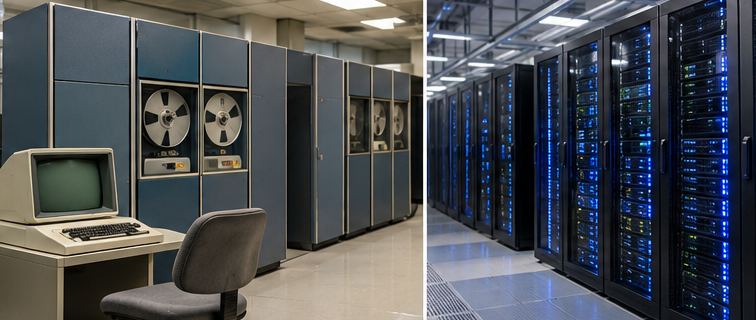
The Mainframe Era: Computing in a Central Location
In the early decades of commercial computing, computers were expensive, physically large, and required specialized environments. Organizations centralized computing in dedicated rooms with controlled power, cooling, and access. Trained operators managed equipment, jobs, removable media, and system maintenance.
Users typically interacted through punched cards, printed reports, or terminals connected to the central system. A terminal often provided a keyboard and display but relied on the mainframe to execute applications and store data. This model allowed an organization to share a costly resource among many departments and users.
Centralization offered control and efficient use of expensive hardware, but it also created dependence on the central system. Capacity planning, scheduling, and access to computing resources were managed centrally. For many businesses, this was the only practical way to obtain significant computing power.
Terminals and Time-Sharing
Time-sharing systems allowed multiple users to interact with one computer during overlapping sessions. The operating system rapidly switched between tasks, giving each user the impression of having a dedicated system. This made interactive computing more practical than submitting a job and waiting for a printed result.
Terminals evolved from simple text devices into more capable displays. Users could edit documents, run programs, query databases, and interact with business applications. The computer remained centralized, while the keyboard and screen could be located throughout an office or campus.
This model has a surprising connection to modern cloud computing. In both cases, users access resources remotely while much of the processing and data management happens elsewhere. The technologies are very different, but the idea of sharing centrally managed computing resources has deep roots.
Minicomputers, Workstations, and Distributed Computing
As hardware became less expensive, organizations gained alternatives to large mainframes. Minicomputers brought departmental computing to laboratories, factories, universities, and smaller businesses. Workstations offered powerful systems for engineering, graphics, and scientific applications.
This broadened access to computing but also distributed responsibility. Departments could acquire their own systems, applications, storage, and networks. Organizations had to manage more machines and coordinate data across systems, creating new challenges for administration, compatibility, and security.
The shift did not mean mainframes disappeared. Large centralized systems continued to serve workloads that benefited from reliability, transaction processing, and high-volume input/output. The industry increasingly used different classes of computers for different jobs.
Personal Computers and Local Networks
Personal computers moved computing onto individual desks. Users could run local applications, store files on local disks, and work without always connecting to a central computer. The IBM PC and compatible market helped standardize a large ecosystem of business software and peripherals.
Local area networks connected these independent computers. Users could share printers, files, applications, and eventually access to the internet. Client-server computing became common: a client application on a desktop requested data or services from a server elsewhere on the network.
This model distributed work between client and server. Some processing happened on the desktop, while databases, file storage, authentication, and shared business logic were centralized. It offered flexibility but introduced network dependencies and the need to maintain servers as well as desktop computers.
The Internet and Web Applications
The growth of the internet changed how organizations connected systems and users. Instead of relying only on private office networks, applications could be accessed across wide geographic areas. The World Wide Web provided a common interface based on browsers, URLs, and HTTP, making it easier to distribute information and services.
Web applications moved more of the user experience into the browser. A user no longer needed a separately installed desktop program for every service. Businesses could update an application centrally and make the new version available to users through a website, although the server infrastructure and browser compatibility still required careful management.
The web also encouraged service-oriented architectures, APIs, and distributed systems. Applications could be assembled from multiple components that communicated over networks. This created flexibility, but failures and performance problems could occur at many points in the chain.
Virtualization: More Than One Server on One Machine
Virtualization allows software to create multiple isolated computing environments on one physical server. Each virtual machine can run its own operating system and applications while sharing the underlying hardware. This improved hardware utilization and made it easier to provision, move, snapshot, and recover server environments.
Virtualization also changed how organizations thought about infrastructure. Instead of treating every application as permanently attached to a particular physical server, administrators could manage pools of compute resources. Workloads could be moved between hosts, and capacity could be adjusted without installing a new physical machine for every application.
Virtualization did not eliminate the need for physical infrastructure. It added a software layer that abstracts the hardware. Performance, storage, networking, licensing, security, and capacity still require attention, and poorly managed virtual environments can become as complex as the physical systems they replace.
Cloud Computing Becomes an On-Demand Service
Cloud computing extended the idea of shared infrastructure by making computing, storage, networking, and higher-level services available through provider platforms. Amazon Web Services introduced Amazon S3 and Amazon EC2 in 2006, helping popularize remotely provisioned storage and virtual computing resources. Other major providers developed competing platforms and service models.
Cloud services can be provisioned through web consoles, APIs, and automation tools. Organizations can scale capacity, create development environments, store objects, distribute content, and use managed databases without purchasing all of the underlying hardware. Billing is often tied to usage, though the details vary by service and provider.
The cloud is not simply someone else’s computer in a simplistic sense. It is a large operational environment built from data centers, networking, virtualization, storage systems, automation, security controls, and service management. Customers still need to design applications, control access, protect data, plan backups, and monitor costs.
Containers, Serverless, and Edge Computing
Containers package an application and its dependencies into a portable unit that can run consistently across supported environments. Container platforms help teams deploy and scale services, while orchestration systems coordinate scheduling, networking, health checks, and recovery across clusters of machines.
Serverless computing moves some infrastructure management to the provider. Developers deploy functions or application components that run in response to events, and the platform manages much of the underlying capacity. Serverless does not mean there are no servers; it means the customer has less direct responsibility for managing them.
Edge computing places processing closer to devices or users when latency, bandwidth, privacy, or local operation matters. Rather than sending every task to a distant data center, some workloads can run near the source of the data. Modern architectures often combine centralized cloud services with local and edge resources.
The Cycle: Centralization and Distribution
Computing history is not a straight line from centralized mainframes to distributed PCs and then to the cloud. It is a cycle of changing tradeoffs. Mainframes centralized expensive resources; personal computers distributed capability to individuals; client-server systems divided work; cloud platforms centralized large-scale infrastructure while making it accessible over networks.
Each model solves some problems and creates others. Centralized services can simplify management and improve consistency, but they create dependencies on providers and networks. Distributed systems can improve resilience and local control, but they increase the complexity of coordination, updates, and security.
The best architecture depends on the application, workload, regulatory requirements, budget, availability goals, and skills of the team operating it. Understanding the history helps explain why no single model has replaced every other one.
References and Further Reading
Putting technology to work for your business
Understanding the technology behind the systems we use helps businesses make better decisions about websites, hosting, data, and online operations. Dyeware provides website development and managed hosting services.