The Evolution of Data Storage: From Floppy Disks to SSDs and the Cloud
The story of data storage is a story of capacity, speed, portability, reliability, and the growing importance of protecting information.
Why Computers Need Storage
Computer memory and storage serve different purposes. RAM provides temporary working space for programs and data currently in use. Storage preserves information when a computer is turned off. Without persistent storage, users would need to re-enter programs and documents every time they started a computer.
Early personal computers often had limited built-in storage. Some used cassette recorders to save programs and files as audio signals. This approach was inexpensive and accessible, but loading and saving could be slow, and users had to manage tapes and know where their data was recorded. Disk drives later made random access and file management much more convenient.
As software became larger and users accumulated more documents, images, music, and video, storage capacity became a defining part of the computer experience. Each generation introduced new ways to store more information in less physical space and retrieve it more quickly.
Cassette Tapes and Floppy Disks
Audio cassette storage was common on early home computers. A computer encoded data into tones that could be recorded and played back by a cassette deck. It was a clever way to use inexpensive consumer electronics, but users had to wait for data to load sequentially. A tape could also be sensitive to recording levels, tape condition, and alignment.
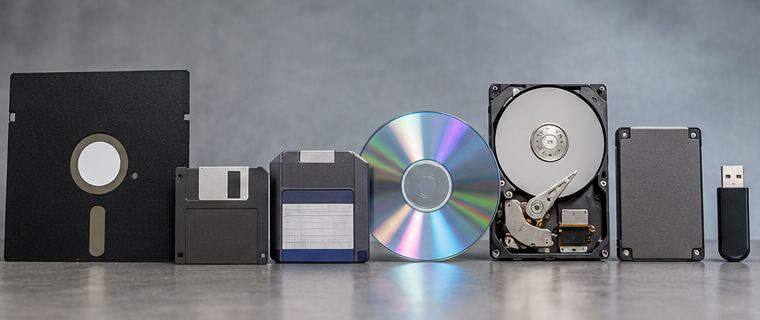
Floppy disks made personal computing more practical. The 5.25-inch disk became familiar in early PCs, followed by the 3.5-inch format, which used a smaller, more rigid shell. Disks could be labeled, carried between computers, and used to distribute software. Their capacity was limited by modern standards, so larger programs and datasets sometimes required multiple disks.
Floppies were not just storage; they shaped everyday habits. Users kept boot disks, program disks, and document disks. They copied files to protect important work, but backup routines were often manual. A damaged or misplaced disk could mean losing the only copy of a document.
Hard Disk Drives: More Space Inside the Computer
Hard disk drives store data magnetically on rapidly spinning platters. Read/write heads move over the surface to access information. Compared with floppy disks, hard drives offered much greater capacity and faster access, making it possible to install software and keep large collections of files on the computer itself.
Early personal-computer hard drives were expensive and relatively small. Over time, capacity increased while cost per megabyte fell. The hard drive became a standard feature in many desktop systems, and later laptop drives brought substantial storage into portable computers.
Because hard drives contain moving mechanical parts, they can be affected by shock, wear, and mechanical failure. They also made backup more important: when a computer contained years of files on one internal drive, losing that drive could be devastating. External drives and network backup later made it easier to maintain additional copies.
Removable Cartridges, CDs, and DVDs
Removable storage attempted to combine portability with higher capacity. Iomega’s Zip drive, introduced in the mid-1990s, used cartridges that initially held 100 MB—far more than a typical floppy disk. Later Zip formats increased capacity. The drives became popular for moving larger files and creating backups, but required compatible hardware and media.
Other cartridge systems, including Jaz, offered greater capacity but did not become universal standards. The market was fragmented: buyers had to consider the cost of drives, media, compatibility, and long-term availability. Some formats were useful for a period but eventually disappeared as hard drives and optical media became cheaper.
Writable CDs and DVDs offered another approach. CDs could store hundreds of megabytes, while DVDs offered several gigabytes. Optical discs were useful for distributing software, archiving photos, and moving files. Recordable discs also had limitations: writing was slower than many modern storage methods, discs could be scratched, and their long-term readability depended on media quality and storage conditions.
Flash Memory and USB Drives
Flash memory stores data in semiconductor cells and has no moving mechanical parts. USB flash drives made removable storage extremely convenient: plug the small device into a port, copy files, and carry them elsewhere. Memory cards brought similar convenience to cameras, phones, and other portable electronics.
Flash storage is fast, compact, and resistant to many kinds of physical shock, but it is not indestructible. Flash cells have finite write endurance, controllers can fail, and small devices are easy to lose. A USB drive is useful for transferring files, but it should not be treated as the only copy of important information.
As capacities grew, flash storage moved inside computers as solid-state drives. These devices dramatically reduced access times compared with mechanical hard drives. They made computers feel more responsive during startup, application launches, and file access, while also reducing noise and power consumption.
Solid-State Drives and Modern Storage
Solid-state drives use flash memory and controllers to manage data. Unlike hard drives, SSDs have no spinning platters or moving read heads. Their low latency makes a noticeable difference in everyday use, particularly when an operating system or application needs to read many small files.
SSDs initially cost much more per gigabyte than hard drives, so many computers used a smaller SSD for the operating system and a larger hard drive for bulk storage. Prices have fallen and capacities have increased, making SSDs common in laptops and desktops. Different interfaces and protocols, including SATA and NVMe over PCI Express, offer different performance characteristics.
No storage technology is immune to failure. SSDs can fail electronically, hard drives can suffer mechanical problems, and files can be deleted or corrupted. Storage devices are not backups simply because they are modern or fast. Important files need additional copies, preferably on separate devices or in separate locations.
Network Storage and Cloud Services
Network-attached storage (NAS) allows multiple computers to access shared files over a local network. Businesses use network storage for shared folders, centralized backups, and collaboration. A NAS can provide convenience and local redundancy, but it remains part of the same physical site and may be affected by fire, theft, power problems, or ransomware.
Cloud storage places data in infrastructure operated by a service provider and accessed over a network. It can make files available across locations and devices, and many services provide version history, synchronization, or automated backup features. Cloud storage is not a single technology: providers use large storage systems, networking, replication, monitoring, and operational processes behind the scenes.
Cloud services introduce their own considerations. Users should understand retention policies, account security, encryption, recovery options, data location, and recurring costs. Synchronization is not always the same as backup: if a file is deleted or encrypted and that change synchronizes, the unwanted change may spread unless versioning or a separate backup is available.
Choosing Storage for the Job
Different storage types serve different purposes. An SSD is well suited to an operating system and frequently used applications. A hard drive can provide economical capacity for large collections of files. A NAS can support shared access and local backup. Removable media can help transfer or archive data, and cloud services can provide off-site access and protection.
The right choice depends on capacity, speed, durability, portability, cost, compatibility, and the importance of the information. For business data, recovery time and the consequences of losing information may matter more than the price per gigabyte. A low-cost device is not a good bargain if it cannot be restored when needed.
The biggest lesson from storage history is that capacity alone is not enough. As people store more valuable information, they need a plan for protecting it. That leads directly to the evolution of computer backups and the methods used to recover files after something goes wrong.
References and Further Reading
Putting technology to work for your business
Understanding the technology behind the systems we use helps businesses make better decisions about websites, hosting, data, and online operations. Dyeware provides website development and managed hosting services.