The Evolution of Operating Systems
From command lines and early personal computers to graphical desktops, mobile platforms, Linux, and virtual machines.
Explore how operating systems coordinate hardware, applications, files, users, and security. This guide follows the development of the technology, explains the ideas behind it, and considers the practical choices that shape how it is used today.
What an Operating System Does
An operating system is the core software layer that manages a computer’s resources and provides services to applications. It coordinates the processor, memory, storage, display, keyboard, network interfaces, and connected devices. Without an operating system, every application would need to understand the details of the hardware it runs on.
The operating system provides abstractions that make computing practical. Applications work with files rather than raw disk sectors, processes rather than directly scheduling CPU time, and network sockets rather than controlling network hardware. These abstractions create consistency, but the operating system still has to manage competing demands and protect one program from another.
When evaluating this area, it helps to separate the underlying technology from the way a particular product implements it. Specifications, operating conditions, support policies, and the quality of the surrounding system all influence the result. A sound design starts with the actual requirement, then selects an approach that can be maintained and measured over time.
Mainframes, Batch Processing, and Time Sharing
Early operating systems developed in environments where computers were large, expensive, and shared. Batch systems collected jobs and ran them with limited user interaction. Later time-sharing systems allowed multiple users to work through terminals, giving each the impression of having access to the computer.
These systems introduced concepts that remain important: scheduling, memory management, file systems, user accounts, permissions, and resource allocation. The interface looked very different from a modern desktop, but the operating system was already responsible for coordinating complex hardware and multiple workloads.
When evaluating this area, it helps to separate the underlying technology from the way a particular product implements it. Specifications, operating conditions, support policies, and the quality of the surrounding system all influence the result. A sound design starts with the actual requirement, then selects an approach that can be maintained and measured over time.
DOS and the Early Personal Computer
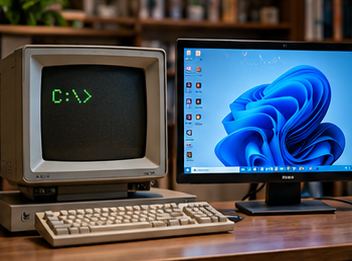
The arrival of affordable personal computers brought operating systems into homes and small businesses. CP/M was influential on early microcomputers, while IBM’s 1981 PC helped establish PC DOS and Microsoft’s closely related MS-DOS in a rapidly growing market. These systems were primarily command-line environments.
Users typed commands to list files, copy disks, launch programs, and configure the machine. Memory and storage were limited, and users often needed to understand directories, filenames, and startup configuration. The command line could be unforgiving, but it was lightweight and well suited to the hardware of the time.
When evaluating this area, it helps to separate the underlying technology from the way a particular product implements it. Specifications, operating conditions, support policies, and the quality of the surrounding system all influence the result. A sound design starts with the actual requirement, then selects an approach that can be maintained and measured over time.
Graphical User Interfaces Change Computing
Graphical user interfaces brought windows, icons, menus, pointers, and direct manipulation to a wider audience. Research systems at Xerox PARC influenced later commercial products, while Apple’s Macintosh and Microsoft Windows helped make graphical computing mainstream. A visual desktop made many operations easier to discover without memorizing commands.
A graphical interface required more memory and processing power than a simple text environment. It also changed how software was designed: applications could use menus, dialog boxes, overlapping windows, and consistent controls. The GUI did not eliminate command-line tools; both approaches continued to coexist and serve different tasks.
When evaluating this area, it helps to separate the underlying technology from the way a particular product implements it. Specifications, operating conditions, support policies, and the quality of the surrounding system all influence the result. A sound design starts with the actual requirement, then selects an approach that can be maintained and measured over time.
Windows, macOS, and Linux
Microsoft Windows became a dominant operating system for personal computers, while Apple developed the Macintosh operating system and later macOS. Linux emerged in the early 1990s as a Unix-like kernel and became central to servers, embedded systems, cloud infrastructure, and many developer environments.
These platforms differ in design, licensing, application ecosystems, and administration. Windows has broad desktop and business software support; macOS integrates closely with Apple hardware; Linux offers a wide range of distributions and is heavily used in servers and infrastructure. None is universally best—the right choice depends on workload, compatibility, support, and user needs.
When evaluating this area, it helps to separate the underlying technology from the way a particular product implements it. Specifications, operating conditions, support policies, and the quality of the surrounding system all influence the result. A sound design starts with the actual requirement, then selects an approach that can be maintained and measured over time.
Mobile Operating Systems
Smartphones required operating systems designed for touch, sensors, battery constraints, cameras, wireless radios, and app distribution. iOS and Android created large mobile ecosystems, with application permissions and sandboxing becoming important parts of platform security. Mobile operating systems also manage background activity to preserve battery life and responsiveness.
A phone is a general-purpose computer with a different interaction model and tighter integration between hardware and software. GPS, accelerometers, biometric sensors, cellular modems, and cameras are exposed to applications through controlled system interfaces. Updates matter because they deliver new features as well as security fixes.
When evaluating this area, it helps to separate the underlying technology from the way a particular product implements it. Specifications, operating conditions, support policies, and the quality of the surrounding system all influence the result. A sound design starts with the actual requirement, then selects an approach that can be maintained and measured over time.
Virtual Machines, Containers, and Embedded Systems
Operating systems are no longer limited to one physical computer at a time. Hypervisors allow multiple virtual machines to run on a single host, each with its own operating system environment. Containers package applications and their dependencies while sharing the host operating-system kernel, making them lighter than full virtual machines in many situations.
Embedded operating systems run inside devices such as routers, appliances, vehicles, and industrial controllers. Some are designed for real-time behavior, where predictable response time matters more than raw throughput. These systems may have very limited memory and interfaces, yet they still need reliable scheduling, device drivers, updates, and security controls.
When evaluating this area, it helps to separate the underlying technology from the way a particular product implements it. Specifications, operating conditions, support policies, and the quality of the surrounding system all influence the result. A sound design starts with the actual requirement, then selects an approach that can be maintained and measured over time.
The Operating System in Today’s Cloud and Devices
Cloud services often hide the underlying operating system from end users, but it remains essential. Virtual servers, containers, serverless platforms, storage systems, and network appliances all depend on software that manages hardware and isolates workloads. Administrators must maintain operating systems, patch vulnerabilities, configure access, and monitor resource usage.
The operating system continues to evolve as processors add cores, devices become more connected, and workloads span local machines and remote data centers. Newer approaches emphasize isolation, automation, energy efficiency, and secure boot and update mechanisms. The interface may change, but the operating system’s central role—managing resources and providing a safe platform for software—remains.
When evaluating this area, it helps to separate the underlying technology from the way a particular product implements it. Specifications, operating conditions, support policies, and the quality of the surrounding system all influence the result. A sound design starts with the actual requirement, then selects an approach that can be maintained and measured over time.
What to Remember
The history of the evolution of operating systems shows that technology advances through a combination of engineering, standards, practical needs, and changes in cost. New capabilities rarely replace everything that came before. Older approaches often remain useful where they fit the workload, while newer ones create additional choices.
For businesses and technology users, the important questions are how a solution performs in its intended environment, how it is secured, how it can recover from failure, and whether it can evolve as requirements change. Understanding the fundamentals makes it easier to evaluate products and avoid decisions based only on marketing claims.