The Evolution of Personal Computing: From 4 KB to Modern Computers
From saving $5 a week for a first computer to machines with gigabytes of memory, discover how personal computing moved from an enthusiast hobby into an everyday tool.
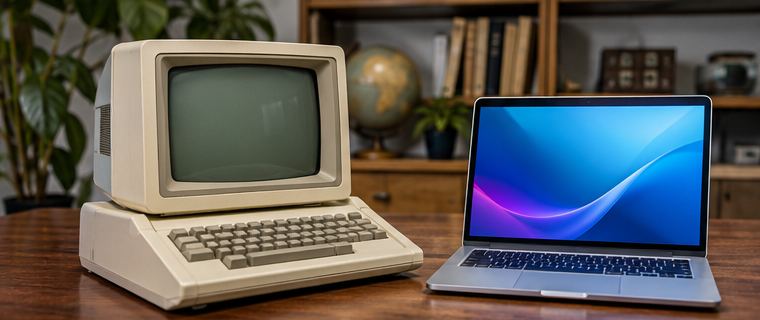
When Computers Moved Onto the Desk
For decades, computing was associated with large machines in corporate, government, university, and research facilities. Access often meant submitting work to an operator or using a terminal connected to a central computer. The personal-computer movement changed that relationship. Instead of sharing time on a remote system, an individual could sit at a keyboard, run programs, create documents, learn programming, and experiment directly.
The mid-1970s hobbyist movement helped demonstrate that a computer could be owned by an individual. The introduction of more complete, ready-to-use systems in the late 1970s broadened the audience. In 1977, the Apple II, Commodore PET, and Radio Shack TRS-80 helped bring personal computing to homes, schools, and small businesses. The TRS-80 was notable for including a display, keyboard, BASIC, and 4 KB of memory in a package that did not require the buyer to assemble a kit.
The appeal was not only practical. A personal computer was a machine people could explore. Users learned BASIC, typed programs from magazines, created simple games, tracked household finances, and discovered that software could be adapted to their own needs. The early experience was often slower and more hands-on than today, but it gave users a level of control that was new.
Saving for a First Computer
For many families, a computer was a major purchase rather than an ordinary household appliance. Some buyers saved for months, compared models, and watched prices carefully. In my case, I saved $5 each week toward my first computer. That small weekly amount made the purchase a goal that required patience, and it captures something about the early personal-computer era: owning one felt like a meaningful investment in a new kind of possibility.
The price of the machine was only part of the expense. A monitor, printer, disk drive, memory expansion, modem, and software could add substantially to the cost. Some early systems used a television for a display and an audio cassette recorder for storage, while others required optional disk drives. Buyers often had to decide which capabilities they could afford immediately and which could wait.
This is a useful contrast with modern devices. Today, a phone or inexpensive laptop can provide capabilities that once required several separate peripherals and a considerable budget. The transformation was not simply that computers became cheaper; the amount of useful computing delivered for each dollar increased dramatically.
Starting with 4 KB of Memory
My first Radio Shack Tandy had 4 KB of memory—4,096 bytes. The Computer History Museum documents the original TRS-80 as a 1977 system with a Z80 processor, 4 KB of memory, a built-in BASIC interpreter, and cassette storage. The exact model of my own machine should be confirmed before attaching model-specific specifications, so this article treats the 4 KB figure as a personal recollection rather than assuming a particular configuration.
Four kilobytes is difficult to imagine when a modern photograph may occupy several megabytes. In an early computer, however, that small memory space had to accommodate the operating environment, program instructions, variables, and the data a program was manipulating. Programmers learned to be economical. They reused memory, shortened data structures, avoided unnecessary features, and often wrote programs that did one focused job.
Programs and files were also much smaller. A text-based program could be useful without elaborate graphics or large libraries. Users frequently typed commands, saved programs to cassette or floppy disk, and learned how the computer behaved by experimenting. Limited resources encouraged an intimate understanding of the machine.
The IBM PC and the Rise of Compatible Computers
IBM changed the business-computing market when it introduced the IBM Personal Computer, model 5150, in August 1981. Rather than designing every component from scratch, the development team used commercially available parts, including Intel’s 8088 processor. IBM also published technical information that helped third parties develop compatible hardware and software. Its decision to use an open architecture helped the PC become a platform rather than a closed, isolated product.
Microsoft supplied the operating system for the IBM PC. The agreement was important because Microsoft retained the ability to license its DOS software to other computer manufacturers. IBM’s version was known as PC DOS, while compatible manufacturers could obtain MS-DOS. That meant a company building a compatible computer did not have to create an entirely new operating-system ecosystem or persuade software developers to write a separate version of every application.
Compaq became one of the best-known early IBM-compatible manufacturers. It developed a compatible BIOS through a clean-room reverse-engineering process, rather than simply copying IBM’s code. Other manufacturers followed with compatible systems. Over time, companies including Dell, Gateway 2000, and HP became recognizable names in the PC market. Their products competed on price, performance, distribution, support, and configuration while running much of the same software.
This was not a single contract that automatically created every PC maker. The combination of IBM’s published architecture, widely available components, Microsoft’s licensing model, and independently developed compatible firmware created the conditions for a large ecosystem. The result was a market in which customers could choose among manufacturers without abandoning the software platform they already used.
From Kilobytes to Gigabytes
As semiconductor manufacturing improved, RAM capacity increased from kilobytes to hundreds of kilobytes, then megabytes and gigabytes. More memory allowed programs to handle larger documents, richer graphics, more data, and multiple tasks. Operating systems could provide graphical interfaces and keep several applications available at once. The change was gradual, with each generation of software often using some of the new capacity to offer features that had previously been impractical.
RAM is working space for the processor and active programs. It is not the same as storage. When a computer is turned off, ordinary RAM loses its contents, while a hard drive, SSD, or other storage device retains files. Confusing these two kinds of memory can make computer specifications difficult to compare, so it is worth keeping the distinction clear.
A modern system with 16 GiB of RAM has 4,194,304 times the capacity of a 4 KiB system. That comparison is a reminder of the scale of change, although it does not mean a modern computer is exactly four million times faster. Performance also depends on processor architecture, clock speed, cache, memory bandwidth, storage speed, software, and the work being performed.
Processors, Graphics, and the Software Experience
Processor development made computers faster and more capable, but improvements were not limited to raw clock speed. Instruction sets, cache memory, memory controllers, integrated graphics, and specialized processing units all influenced what a computer could do. Software also became more sophisticated, taking advantage of larger memory and faster storage.
Graphical user interfaces helped make computers more approachable to people who did not want to learn command syntax. The mouse, windows, icons, menus, and desktop metaphor changed how users interacted with software. Early graphical systems demanded more memory and processing power than many text-based applications, but they made common tasks easier to discover and perform.
Printers, sound cards, CD-ROM drives, networking, and later USB expanded what a personal computer could connect to. The PC gradually became a general-purpose hub for work, education, entertainment, communication, photography, and creative projects. Each peripheral and software generation added new expectations about what a computer should be able to do.
From Desktops to Laptops, Phones, and Cloud Services
As components became smaller and more energy efficient, computing moved beyond the desktop. Portable computers first involved compromises in weight, battery life, screen quality, and performance. Over time, laptops became powerful enough for many of the same tasks as desktop systems. Tablets and smartphones then placed computing, cameras, navigation, communication, and internet access into devices people could carry everywhere.
Wireless networking and mobile broadband changed when and where people could work. Applications increasingly synchronized information through remote services, allowing a document or photo to be available on more than one device. Cloud storage and web applications also reduced the need to keep every file and program on one computer, although they introduced new dependencies on connectivity, accounts, service providers, and data-protection practices.
The modern personal computer is therefore not just a box on a desk. It is part of a connected environment involving local processors, networks, remote servers, online storage, peripherals, and software services. The device remains important, but much of the experience depends on systems working together.
What Changed—and What Remains the Same
The hardware has changed almost beyond recognition, but the basic purpose of personal computing remains familiar: give an individual access to tools for creating, organizing, communicating, learning, and solving problems. A spreadsheet on a modern laptop is descended from early business software; a programming environment continues the experimentation that attracted hobbyists; and a browser makes information available in ways early computer owners could only imagine.
The history also shows that technology advances through interacting developments. Better processors need memory and storage; better networks make remote services practical; software gives hardware a purpose; and competition can make new capabilities affordable to more people. No single invention explains the transformation.
From saving $5 a week for a first computer to carrying a powerful connected device in a pocket, the personal-computing story is ultimately about access. Capabilities once limited by cost, size, and technical expertise have become ordinary tools for billions of people.
References and Further Reading
Putting technology to work for your business
Understanding the technology behind the systems we use helps businesses make better decisions about websites, hosting, data, and online operations. Dyeware provides website development and managed hosting services.