The Evolution of Multi-Factor Authentication
From printed one-time codes and hardware tokens to authenticator apps, push approvals, and phishing-resistant methods.
Why one factor was not enough
A password proves knowledge of a secret, but passwords can be guessed, reused, stolen, or disclosed through phishing. As online accounts became more valuable, organizations sought a second proof that would be harder for an attacker to obtain remotely. Multi-factor authentication combines evidence from different categories: something the user knows, possesses, or is.
Two passwords are not necessarily two factors because both are knowledge factors. A password plus a hardware token is a stronger combination because the evidence comes from different categories. The design and implementation matter: recovery processes, enrollment, and user education can become weak points.
Printed lists and protected code cards
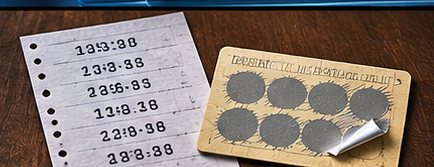
One early approach used a printed list of one-time passwords. Each entry could be used once, and a system might request a particular numbered code or the next code in sequence. Another approach used protected cards with concealed values, sometimes revealed by scratching off a covering when a code was requested.
Paper-based methods were simple to distribute and did not require a powered device, but they could be lost, copied, photographed, or stolen. They also required users to keep the list available and organizations to manage replacement and revocation. These methods illustrate the basic idea of adding a separate possession-based credential.
Hardware tokens
Electronic hardware tokens made one-time authentication more convenient. Some displayed a changing numeric code; others connected through USB or smart-card interfaces. Certain devices generated time-based codes, while others used event counters or challenge-response mechanisms.
Hardware tokens helped organizations strengthen remote access without relying on mobile phones. They also introduced lifecycle questions: how to issue, register, replace, revoke, and recover a lost device. Physical possession is useful evidence, but a token can still be stolen or used by an attacker who has also obtained the password.
Authenticator apps and TOTP
Time-based one-time password systems use a shared secret and a time counter. The authenticator and server independently calculate a short code for the same time interval, commonly 30 seconds. Because both sides have the same secret and time reference, they can arrive at the same value without the phone contacting the server for each code.
TOTP codes are convenient, but short numeric codes can be phished in real time. Users may enter a code into a fake website, allowing an attacker to relay it to the real service. Rate limiting, careful enrollment, secure secret storage, and phishing-resistant alternatives are important considerations.
SMS and push authentication
SMS verification made second-factor authentication accessible to a broad audience, but phone numbers can be redirected through SIM-swap attacks, message interception, or weaknesses in account recovery. SMS is generally less resistant to phishing than cryptographic authenticators.
Push authentication asks a user to approve or deny a sign-in on a registered device. It can be convenient, but repeated approval prompts may lead to fatigue or accidental approval. Number matching, context display, rate limits, and user training can reduce some risks.
The move toward phishing resistance
FIDO security keys and passkeys use public-key cryptography and bind authentication to the legitimate website origin. This makes them more resistant to credential phishing than passwords and one-time codes. They can also simplify sign-in by using a device authenticator and local user verification.
MFA remains a broad category, not a single technology. Organizations should select methods based on risk, user needs, device availability, and recovery requirements. The evolution from paper codes to modern cryptographic authentication shows how the industry has continually sought stronger evidence of identity.
MFA enrollment and fallback
Enrollment is a security-sensitive event because it links a new authenticator to an account. Services should verify the user before adding a device, notify users about new authenticators, and provide a safe way to remove devices that are lost or no longer trusted. Backup codes can help with recovery, but they should be stored securely and treated like credentials.
Organizations should consider accessibility, travel, offline environments, shared devices, and users who cannot carry personal phones. A good MFA policy provides secure alternatives without making the easiest recovery path the weakest one. Authentication strength should be assessed across enrollment, daily use, and account recovery.
Key takeaways
- Security is a combination of technology, people, policies, and ongoing maintenance.
- Choose controls that address the actual risks and test that they work as intended.
- Review access, keep systems updated, and plan for recovery before an incident occurs.
Putting security into practice
Security decisions affect websites, applications, communications, and the information organizations manage. Dyeware's Resource Center explores these subjects to help readers understand the technologies and tradeoffs involved. Where relevant, Dyeware services and products provide examples of how these principles can be applied in real-world projects.